

Four videos. One funnel. Only the engaged move forward.
Only people who watched go to the next video.
Tag pages → Bundle campaigns → Carry warm & hot forward
Watch
From manual follow-up to intent-based funnel
Page Funnel
- Page Funnel project — up to four ordered Share Pages with a progress strip
- One campaign per step — each step has its own go-live, close, and analytics (not one mega-campaign)
- Bonus funnel templates — Lead Gen, Demo, Onboarding, Training, and more; reskin videos or copy page copy
- One-click campaign bundle — matching draft campaigns grouped under the same name
- Export funnel schedule (.ics) — all step go-lives and closes into your calendar
- Carry audience forward — import from the previous step with engagement filters (default Warm + Hot)
- Opt out once — suppressed on every future step import in that funnel
- Funnel metrics rollup — step views, CTA, and campaign links in one place
- Flexible outreach — export links to your CRM or mail merge, or Open in mail per row (mailto); Vyrol hosts video and tracks intent per link
Included with Share + Campaigns — not a separate product or add-on fee. Step 1 is your list; every later step filters by opens, watch %, CTA, and callback intent. Opt out once on any recipient row and that contact is suppressed across the whole project.
Each funnel step is its own campaign (one video, one campaign row). Set go-live and scheduled close per step in Campaign settings — not on the Share Page alone. Export the whole project to your calendar from Funnel metrics.
Bonus funnel templates
Pick a starter framework in the app — swap in your Studio renders, edit titles and CTAs, or copy the suggested messaging. Templates are included; you are not buying a separate funnel product.
- Lead generation
- Product demo
- Sales follow-up
- Customer onboarding
- Training series
- Customer support
- Event promotion
- Start blank
Need more than four videos?
Each funnel project supports up to four steps. For steps 5–8, start a second funnel project (phase 2): export warm & hot contacts from phase 1 Step 4, import into phase 2 Step 1, then carry forward on Steps 2–4 inside that project. Do not duplicate an old campaign — new pages need new campaigns and new links.
How Page Funnel works
- 1
Structure
Tag Share Pages as Steps 1–4 under a named funnel project — or start from a bonus template.
- 2
Bundle
Campaigns → New → Page Funnel project — draft campaigns appear in one group.
- 3
Step 1 send
Import CSV once, publish, then send via your CRM, mail merge, or Open in mail on each row.
- 4
Step 2+
Carry audience forward — warm & hot only, skip opted-out contacts.
Watch
Not sure video outreach will work?
What it looks like in Vyrol
One focused workflow inside Share + Campaigns — structure pages, bundle campaigns, then advance only engaged prospects. Screenshots below; create a free account to open the product.
Share Pages funnel
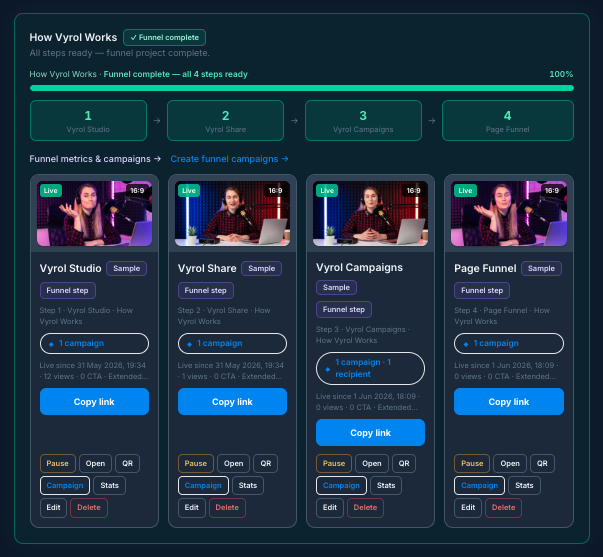
Funnel project on Share Pages
Four live steps with progress, presets per stage, and campaign links on each page.
Campaign bundle
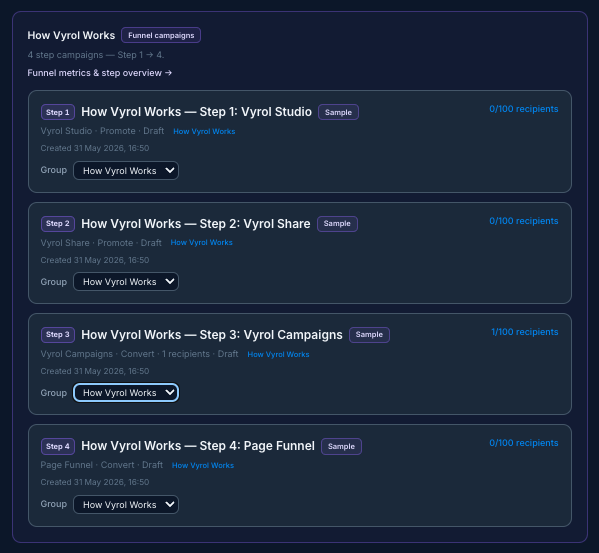
Campaign bundle by step
Matching campaigns grouped — Step 1 through Step 4 ready to publish in sequence.
Carry audience forward
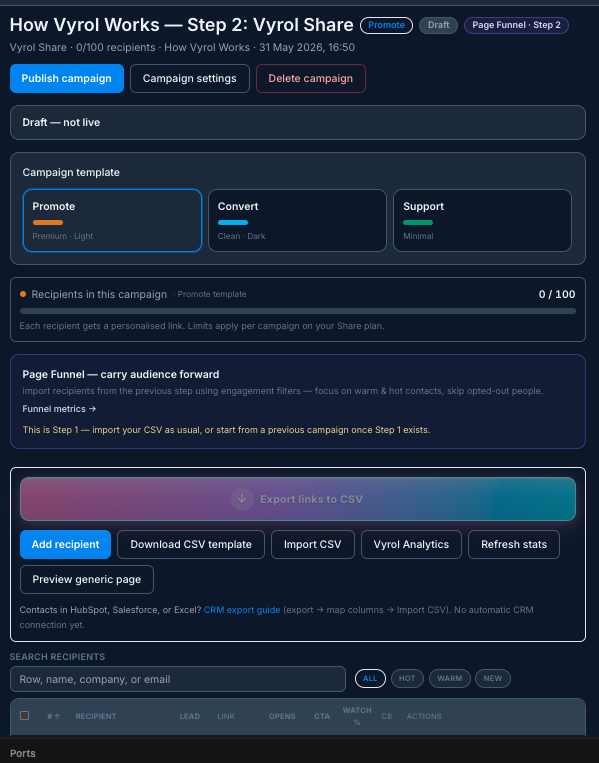
Carry audience forward
Pick a filter, preview eligible contacts, import — no CSV on Steps 2–4.
Included with Share + Campaigns
Produce each step's master video in Studio, publish on Share Pages, then run the funnel in Campaigns.
Stop sending Video 4 to people who skipped Video 1
Included with Share and Campaigns.